
The Product Security Playbook
Are You Trusting the Wrong Data? The Case for Input Validation
By Chad Butler ·
Input validation is one of the most critical yet underutilized secure coding techniques. This article breaks down the essentials and offers practical recommendations to help you improve your security practices.
Why Input Validation Matters
Input validation has been a best practice since the late 1990s, and most developers recognize its importance. However, it often gets deprioritized, or developers rely solely on frameworks without fully understanding their effectiveness.
Every year, MITRE publishes the top 25 most dangerous software weaknesses. Of the 15 vulnerabilities consistently on this list over the past 5 years, 9 could be mitigated by proper input validation. Yet, many developers miss input validation issues due to:
- Focusing solely on code quality
- Needing reminders to prioritize security
- Lacking confidence in identifying security flaws
The developers who successfully catch these issues often do so because they’ve seen them before, highlighting the value of secure development education and training.
It can be daunting to know where to start. Here is my super simple, practical 3-step list for getting started:
Step 1: Validate Early
Validate inputs as soon as they enter your system. This prevents invalid data from propagating, reducing the risk of exceptions and errors later on. Early validation can also act as an attack indicator—if server-side validation catches something that passed client-side checks, it suggests an intrusion attempt. This assumes that your client-side checks match your server-side checks. They really should!
Example: HTML5 Form Controls HTML5 form controls are a straightforward way to enforce early validation. Here’s a simple example that ensures account numbers are 5-15 digits long:
<form>
<input type="text" name="account" pattern="^[0-9]{5,15}$">
<button>Submit</button>
</form>
Client-Side Validation with CSS and JavaScript
Use HTML5 form validation rules in combination with CSS pseudo-classes like :valid and :invalid to style input based on validation outcomes. The JavaScript Constraint Validation API can provide further checks, ensuring form elements adhere to specified attributes. I included a link to some example code that shows these concepts in action. Check it out.
Validating early will help you avoid problems. Always make sure to enforce your client-side validation with matching server-side validation.
Step 2: Validate at Trust Boundaries
Never trust data from external systems, even if they claim to validate it. You can’t guarantee their validation is sufficient, and it might change over time. Always verify input when it crosses system boundaries.
Case in Point: Trust Boundary Failures
During a penetration test, I set my display name to <script>alert(0)</script>. The system correctly handled the input, but months later, the script executed when accessed by a different application that trusted the data. This is a classic example of a trust boundary failure. Always validate data from external sources, even if it appears safe.
Never assume, always verify.
Step 3: Prefer Allow-List Validation
Deny-list validation, which tries to block known bad inputs, is often ineffective because attackers can easily bypass it using various encoding tricks. Consider the < character—it can be encoded in over 70 different ways, making deny-lists difficult to maintain.
Here are all the variations for the < character that you need to include in your deny-list validation:
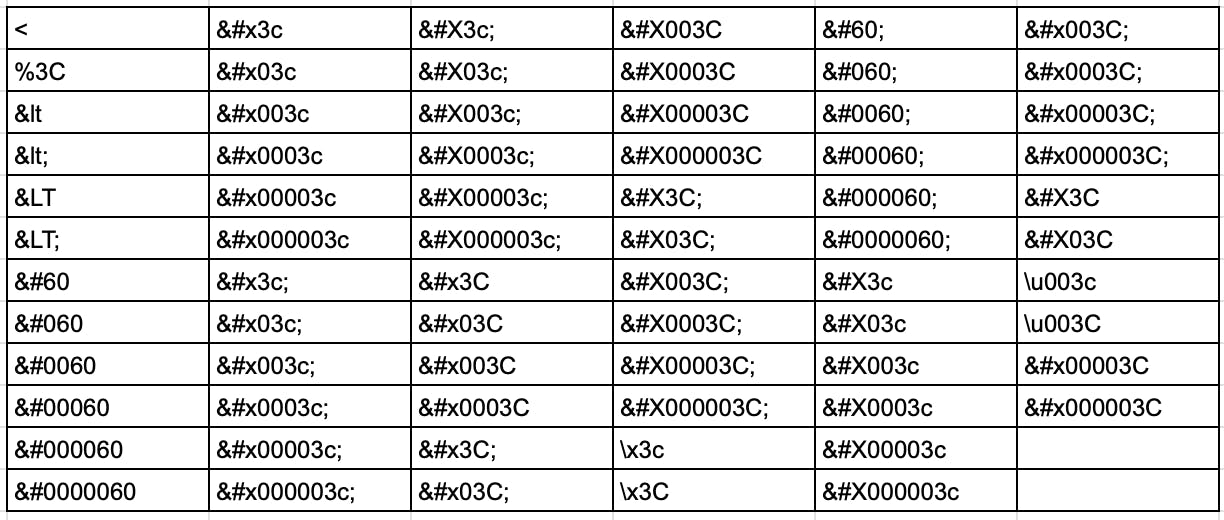
Allow-List Validation defines acceptable inputs and rejects everything else. This approach is simpler, more secure, and less prone to manipulation.
Finally
Effective input validation is a crucial layer of security that protects against many common vulnerabilities. By validating early, verifying data at trust boundaries, and using allow-lists, you can significantly strengthen your applications’ defenses. Prioritize input validation, and ensure your team is trained to recognize and address these issues.
Diving Deeper
Here are some resources to help you dive deeper:
- HTML5 Validation with CSS & JS Example
- CWE Top 25: https://cwe.mitre.org/top25/
- Why Don’t Developers Detect Improper Input Validation?: https://arxiv.org/abs/2102.06251
- OWASP Input Validation Cheat Sheet: https://cheatsheetseries.owasp.org/cheatsheets/Input_Validation_Cheat_Sheet.html