The Product Security Playbook
SMS MFA = Gross Negligence
By Chad Butler ·
It Is Time to Ditch SMS as an Authentication Factor
The recent cyber-espionage campaign by the Chinese group Salt Typhoon compromised U.S. telecommunications networks in significant ways, raising red flags about the reliability of SMS-based multi-factor authentication (MFA). Attackers breached major carriers, including AT&T, Verizon, and T-Mobile, gaining access to sensitive data like call records, live calls, and unencrypted text messages.
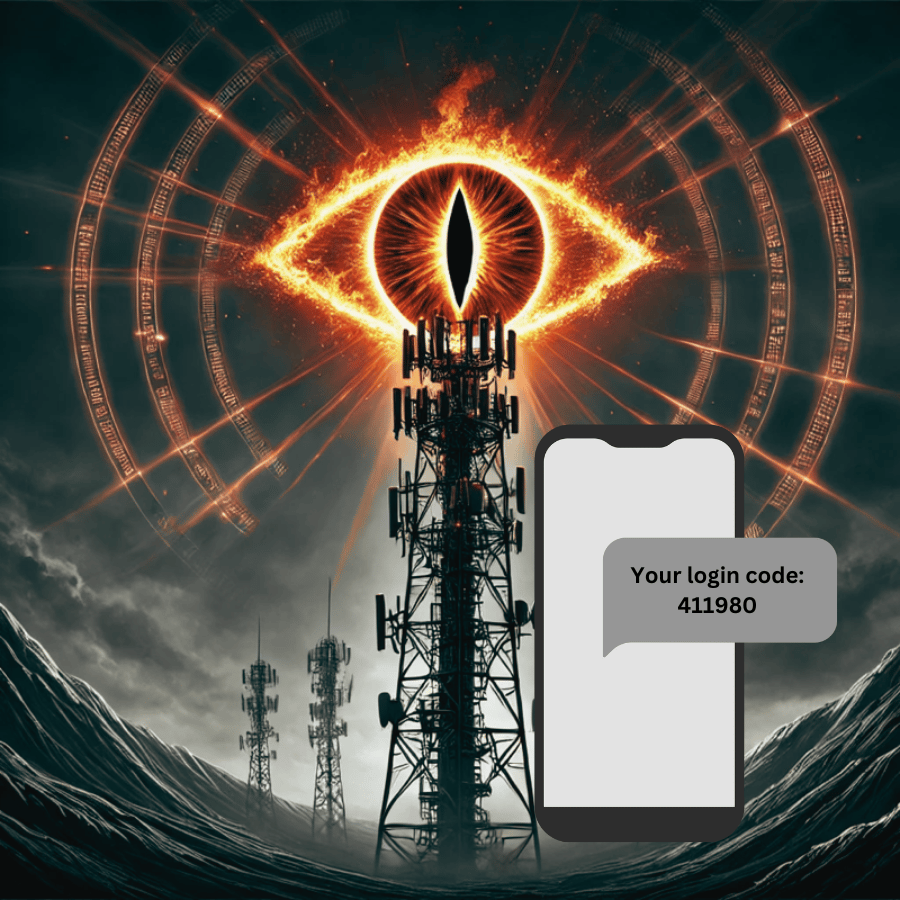
These vulnerabilities expose a glaring issue: SMS was never an acceptable option for securing accounts. The recent telecommunications breaches should put an end to any doubt.
Since SMS messages are transmitted in plaintext, they can be intercepted by malicious actors with access to telecom infrastructure. Think of SMS like sending a postcard—anyone along the way can read it. Once intercepted, attackers can bypass MFA protections entirely, exposing user accounts to fraud and exploitation.
Sauron Cell Towers
Unfortunately, many companies still cling to SMS for MFA despite mounting evidence of its insecurity.
A Poor Excuse: MFA Will Kill Conversion
One of the most common objections to upgrading authentication methods is the fear of losing customers. Many organizations push back with the following:
- Too much friction - If our users have to do anything extra, they won’t buy from us.
- High support burden - Our support team will be overwhelmed with calls about login issues.
- Snowflake - Our situation is unique, and the standard advice doesn’t apply to us.
The good news? These excuses no longer hold water. User behavior and authentication technologies have evolved. It’s now possible to build systems that are both secure and user-friendly.
Here are three important steps that many people miss.
Step 1: Determine Your Risk
The first step in upgrading authentication is understanding your risk. NIST SP 800-63 provides a clear framework for identifying the right authentication approach based on your specific use case.
Start by conducting an initial impact assessment to map out the potential harm from a breach. This involves:
-
Understanding the Service: What is your service doing? Who uses it? What data or transactions are involved?
-
Categorizing Potential Risks: Think about confidentiality, integrity, and availability:
- Too much friction - If our users have to do anything extra, they won’t buy from us.
- High support burden - Our support team will be overwhelmed with calls about login issues.
- Snowflake - Our situation is unique, and the standard advice doesn’t apply to us.
- Assessing Impact Levels: Think about the impact from a security breach:
- Low: Minimal harm - minor inconvenience.
- Moderate: Significant harm, like financial losses or reputational damage.
- High: Catastrophic harm, like severe financial loss or safety risks.
Here’s how impact levels align with NIST’s identity proofing and authentication assurance levels (IAL and AAL):
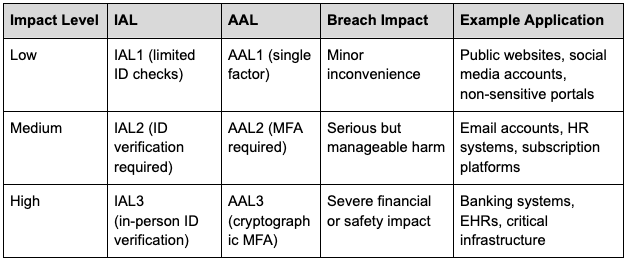
NIST Authentication Assurance Levels
Step 2: Choose the Right Second Factor
Once you understand your risks, you can determine which additional factor works best for your needs. NIST categorizes authentication factors into three types:
- Something You Know: A password or PIN.
- Something You Have: A physical device like a hardware token or phone.
- Something You Are: Biometrics like fingerprints or facial recognition.
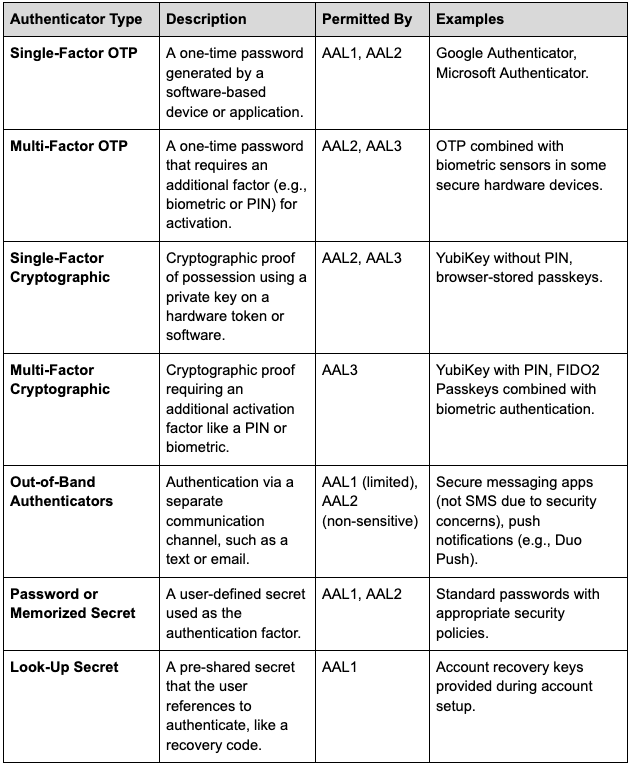
NIST 800-63 provides a framework for determining which authentication factors are acceptable for an application.
Summary of Permitted Authenticator Types:
True multi-factor authentication (MFA) requires combining two different types of factors. For example:
- Password (something you know) + Hardware token (something you have) = MFA ✅
- SMS OTP (something you have) + Email OTP (also something you have) = Not MFA. ❌
Avoid the common mistake of using two instances of the same factor type and calling it MFA. Instead, focus on pairing diverse factors to strengthen security.
Step 3: Plan for Implementation
Upgrading your authentication system involves deciding whether to build your own solution or buy one. There are many considerations. Many engineering teams will dive into building it because… “nobody can build software as good as we can.” That may be true. But before you begin, consider these benefits of buying instead of building:
- Standard implementations can be dropped in with minimal effort
- A vendor can help absorb the increase in support calls that typically follow a new authentication system rollout
As always, the disadvantage of a purchased solution is the potential limitation in customization. However, before overstating this concern, it’s important to determine whether that customization is genuinely necessary.
If building a solution is the right decision for your organization, it must be carefully planned and executed. Viewing this solely as a technical project is a mistake. Authentication solutions are cross-functional initiatives that should be managed as a product suite to ensure success.
At a minimum, ensure that you do the following for security:
Planning Phase:
- Identify security requirements and assurance levels (AAL) for your authentication system.
- Conduct a risk assessment to understand potential threats and vulnerabilities.
- Choose authentication factors that meet your organization’s usability and security needs (e.g., passkeys, hardware tokens).
Implementation Phase:
- Use encryption to protect sensitive data in transit and at rest.
- Implement phishing-resistant MFA options (e.g., Passkeys, or FIDO2-based hardware tokens like YubiKeys).
- Conduct penetration testing on the authentication system to identify weaknesses.
- Establish monitoring and logging to detect unauthorized access attempts.
Launch Phase:
- Conduct user training on the new authentication process.
- Roll out in phases, starting with low-risk user groups, to minimize disruption.
- Monitor system performance and user feedback to identify any issues post-launch.
- Set up ongoing maintenance and update cycles for your authentication system.
- Ensure fallback mechanisms (e.g., account recovery) are secure and user-friendly.
Finally
Switching away from SMS-based MFA isn’t just about better security; it’s about future-proofing your authentication system against evolving threats. By assessing your risks, choosing the right second factor, and planning implementation thoughtfully, you can protect your users and your business without sacrificing convenience.
Diving Deeper
Here are some resources to help you explore further: